
Wills: how to view your will
If you’ve already created an adeus will, simply open 'My Wills' from the homepage, the click the ‘View My Wills’ button to open the My Wills page. Here you can view your most recent wills, and all previous wills you have created.
In the My Wills page, your wills are presented in date order with your current will first.
If you have uploaded your signed will to adeus True Wills, this will be listed first.
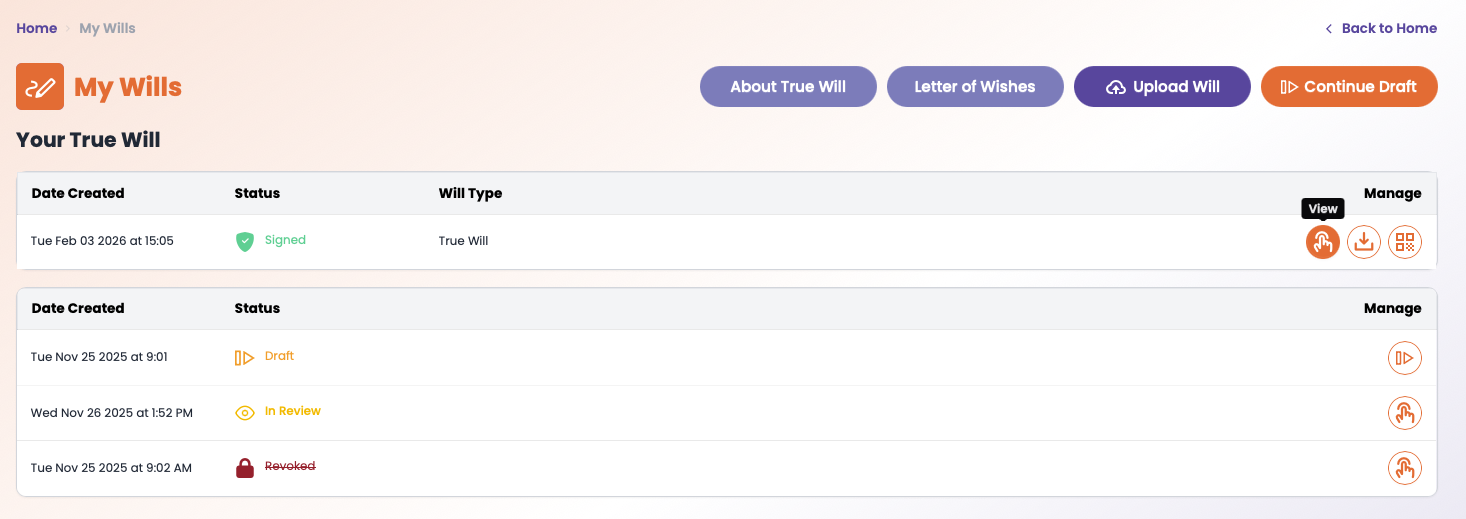
Simply click the ‘finger’ icon to view your current approved will, or previous revoked wills.
You can download your most recent will by clicking the download ‘arrow’ icon.
You can also access the ‘Last Wishes’ section of the adeus Digital Vault by clicking the purple button.
Important: When you ‘View’ your will, it will open in a new browser tab. If you don’t see it, please check that you allow ‘pop ups’. If you have a pop up blocker, this will stop the page from opening. (This is a setting in your browser.)