
reporting a bug
If you spot a bug in adeus, or perhaps a small typo, we'd love you to let us know so we can fix it. Simply follow these simple steps.
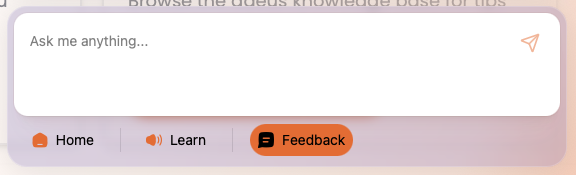
Step 1: Open the adeus help centre in the bottom right of the screen
Step 2: Click 'Feedback'.
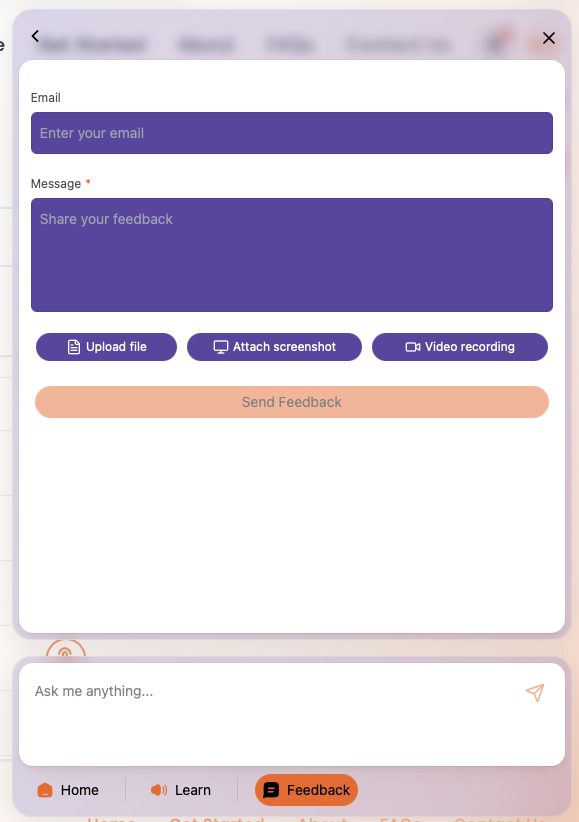
Step 3: Enter your email address so we can reply to you directly.
Step 4: Provide as much detail about the bug or other feedback in the Message section.
Step 5: if you want, you can upload a file (for example a document or image of the bug or error), or you can take a Screenshot or a Video directly in adeus.
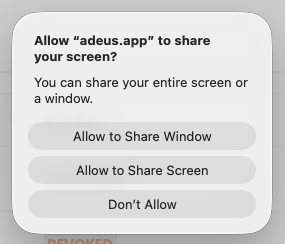
Step 6: If you want to take a screenshot, or a video, simply click the relevant button. When prompted Allow adeus to access your screen, simply click 'Allow to Share Window' in Mac, or similar in a PC.

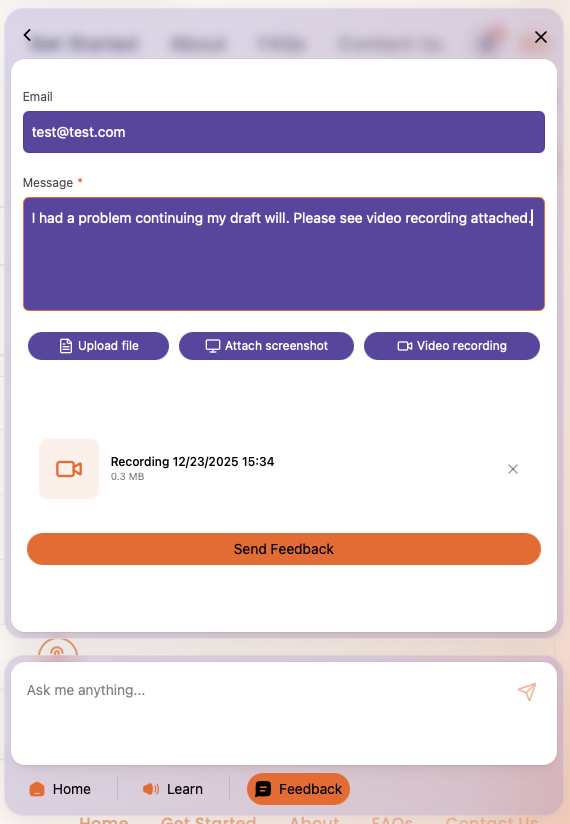
Step 9: Review the information in the Feedback window, if everything is correct simply click the 'Send Feedback' button. Your feedback will be sent to our team and we'll review and respond to you ASAP, generally within one business day, but usually within an hour or two during UK business hours.
We really love receiving feedback, and actually enjoy finding bugs so we can squash (we mean 'fix') them so they don't annoy anyone else.